HID iClass Guide
This is a guide to reading & writing to HID iClass cards with your Flipper Zero.
Download Apps
- PicoPass App: - Use this application to read iClass cards, and preform NR-MAC attacks for iClass SE
- Seader App: - Use this application to read iClass SE and SEOS if you have a HID SAM or a SAMAdams
Which card type do I have?
Use the chart below to determine which card type you have.
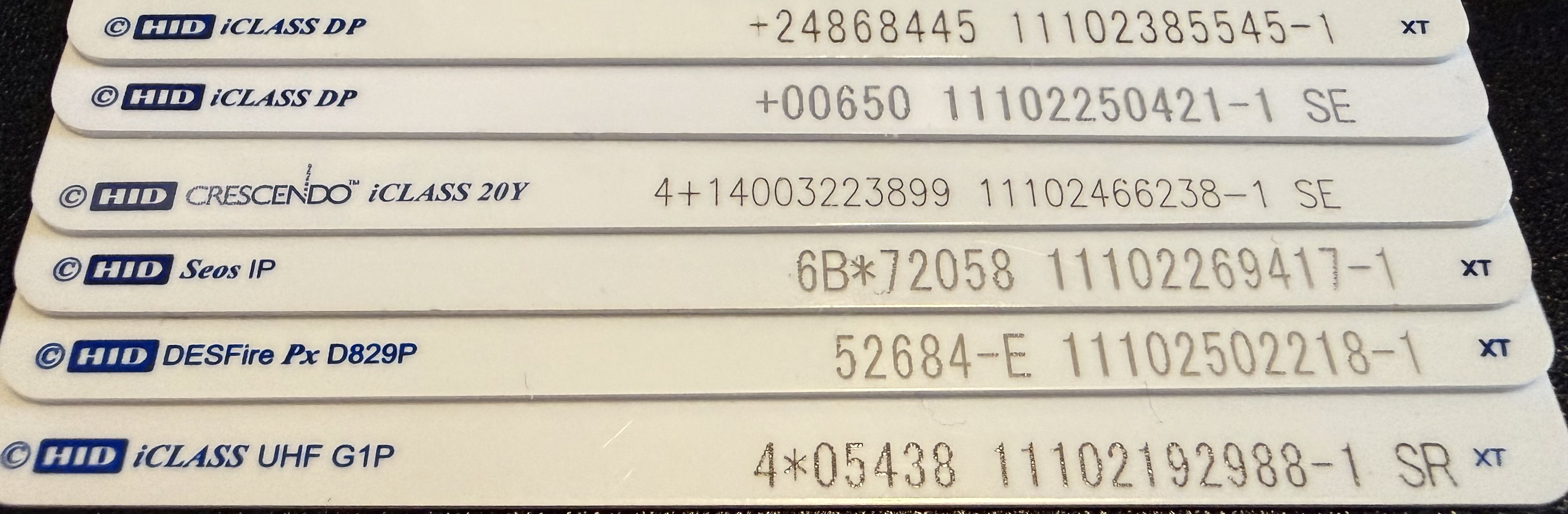
Card Types
- Card 1: Legacy iClass (note the lack SE or SR after the numbers)
- Card 2: iClass SE (note the SE after the numbers)
- Card 3: iClass SE - Crescendo (note the SE after the numbers and the Crecendo before iClass)
- Card 4: SEOS - NOT iClass at all, newer type of card than PicoPass supports. See HID SEOS for more information.
- Card 5: HID DESFire - NOT a iClass credential, this is a HID Mifare DESFire card.
-
Card 6: HID iClass UHF SR Variant (note the SR after the numbers and the UHF after iClass)
-
Note: There is another card type that's not listed in the photo above. Instead of SE/SR, it has ER. These cards are iClass SE & custom programmed.
-
If you have a fob, the metal tag on the back might have letters to the right of the numbers.
"My Letters aren't there/rubbed off!"
- You can check by reading the card on the PicoPass app.
- If it says "SE enabled; Read Failed; Auth Failed" than it's a iClass SE card.
- If it says 26 bits/any other length (eg 36, 42) and no +SIO under, and "Key: Standard" you have a Legacy iClass credential with regular keys.
- If it says 26 bits/any other length (eg 36, 42) and +SIO under, and "Key: Standard" you have a iClass SR credential with standard keys.
- If it says "Read Failed; Auth Failed" and not SE enabled above, you have a Elite Key locked Legacy or SR credential. The only way to tell the difference between them is preform a NR-MAC or Loclass attack.
How To Read Cards
- For iClass Legacy:
- Open the PicoPass app on your Flipper Zero. Click Read and present your iClass credential to the back of the flipper.
- For iClass SR:
- Same proccess as iClass legacy, but there is a "+SIO" on the post-read screen, as the SR variant holds more data. The Flipper will still emulate this, but the SIO is tied to the CSN, so you will have to attempt a downgrade attack to put it on a actual card.
- For iClass SE:
- When you read the card in the PicoPass app, it should say "Read Failed; Auth Failed." To read the data (NOT write) move to the "NR-MAC Attacks" section of the PicoPass app. -Note: If you save the iClass SE credential and open the saved file, there is a chance you will be able to emulate the credential on non-updated readers that may not have the patch installed.
Elite Cards
"But my card is a Legacy/SR and I can't read it!"
This means your credential is Elite. Your credential is locked to a non-standard key that the Flipper attacks. Look at the Loclass and the Elite Keygen Attack sections of the PicoPass app listing to preform the attack and possibly get the key for the card.
If neither of those options work, you can try the "NR-MAC Attacks" as a last resort to read the card's data.
Downgrade Attacks
Depending on your card type (either iClass SE or SEOS), you might be able to preform something called a Downgrade Attack.
- Some readers support multiple technologies, so the important data in iClass SE/SEOS cards can be put into a different format/protocol, but treated the same by the reader. A key part of this is determining if the reader has the target technology you want enabled.
- iClass SE/Seos -> iClass (legacy): Check out this information for how to determine if this might work on GitHub.
- iClass (legacy) -> LF RFID (t5577): Test if the reader has 125khz enabled with RFID detector and use picopass to "Save as lfrfid".
Writing
- To write to iClass cards, you must have the following:
- A iClass card of the same type to write to with standard keys/Elite keys the Flipper has saved
- Disclaimer: You CANNOT write to iClass SE cards
- PicoPass will only work with genuine iClass cards, and not Mifare Classic or any other 13.56 mHz cards. They must be iClass.
More iClass Info
If you'd like to learn more about HID cards and iClass, check out this markdown file
Any Questions?
Feel free to ask in #nfc in the Flipper Devices Discord Server, or the #iClass channel in Iceman's RFID server.